This guide explains how to use the Feasibility and AmBitiousness (FAB) Dashboard, step by step. By the end of the guide, you will be able to assess the credibility of a sustainability target by evaluating its feasibility and ambitiousness using country benchmarks and peer analyses.
New to the concepts of feasibility and ambitiousness? Visit the Introduction page first to review the concepts or watch the explainer videos. This guide assumes familiarity with the concepts and focuses on putting them into practice.
The guide uses a case study on the primary completion rate in Senegal to illustrate how the Dashboard can be applied in practice. The example is for illustrative purposes only. Users can open the pre-filled case study analysis to see the configuration and results used throughout the guide. Alternatively, open a blank analysis to build the analysis from scratch while following the steps.
For questions, please contact esgdata@worldbank.org.
Step 1 – Choose your indicator
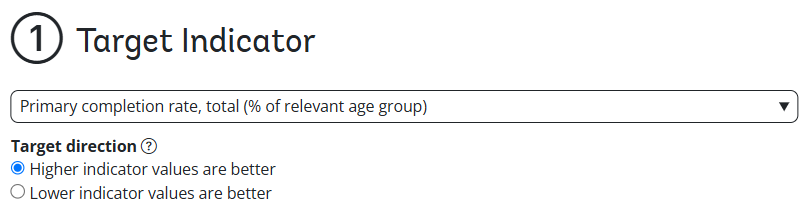
Open the Target Indicator drop-down menu and select an indicator from the ESG Data Portal for which a target will be tested, such as a school completion rate or an emissions measure.
Set the Target direction to decide whether higher targets are desirable, such as increased access to health care, or whether lower targets are desirable, such as reduced emissions. This determines how feasibility and ambitiousness are calculated in every later step.
Action taken: Select Primary completion rate and set the target direction to Higher is better.
Why: Higher primary completion rates represent better outcomes, so improvements are assessed as movement toward higher values.
Step 2 – Choose your country
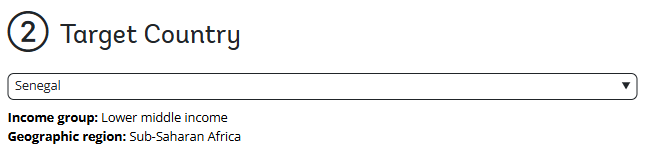
Open the Target Country drop-down menu and select the country to which the target applies. For reference, the Dashboard displays the selected country’s current income group and geographic region.
Action taken: Select Senegal from the list.
Why: The case study focuses on Senegal.
Step 3 – Build your peer group
Use the recipe to define a group of comparable peers: countries with characteristics that are similar to the target country and relevant to the selected indicator. Peers can be selected by region, income group, or custom criteria to support fair and realistic benchmarking. There is no single correct peer group, and the tool does not prescribe which countries to select. The appropriate selection depends on the country context, the indicator, and the assumptions being tested.
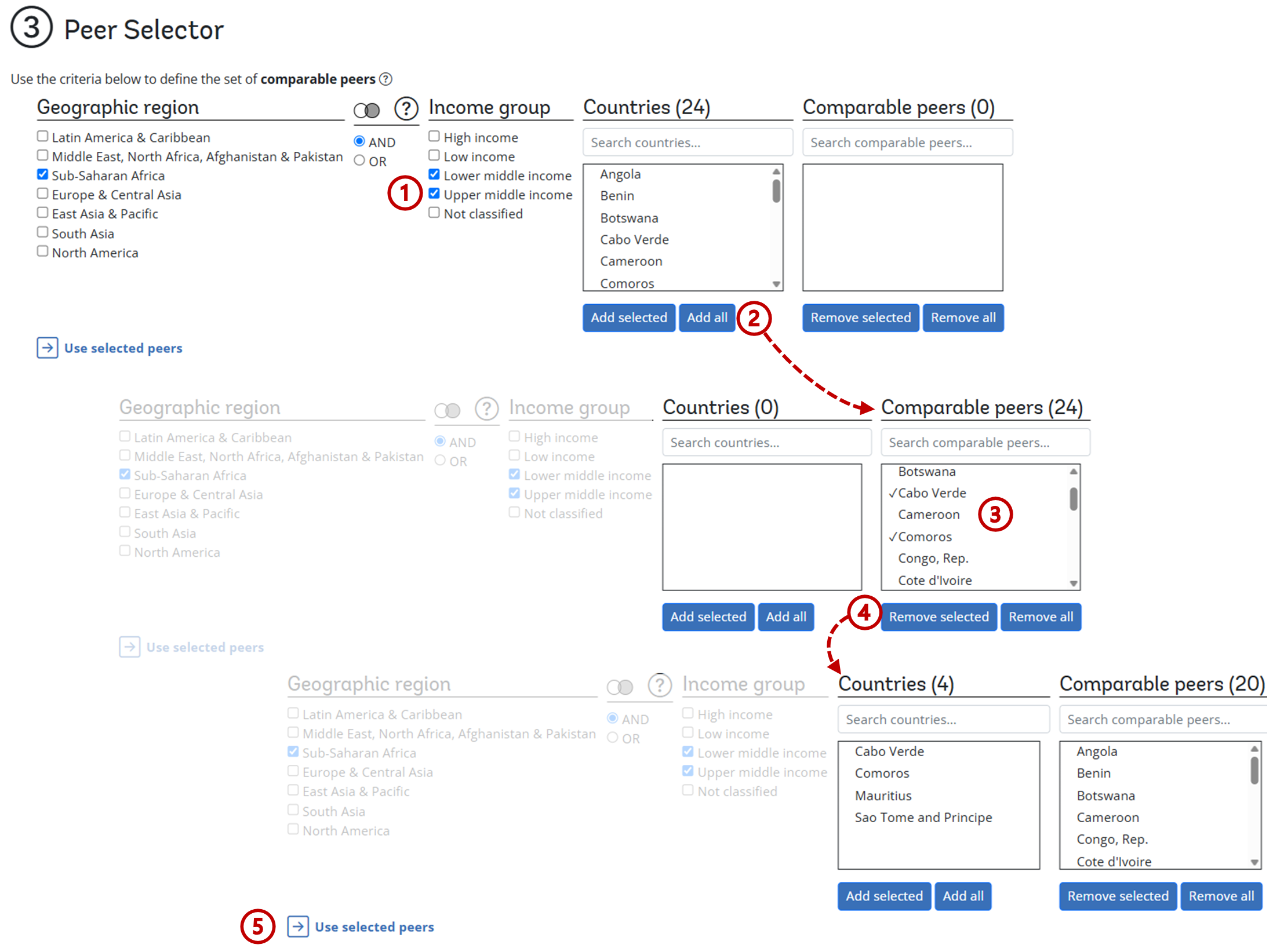
Define your base peer group: Use the Geographic region and Income group checkboxes to narrow the list of candidate countries. By default, the Dashboard selects peers that share both the same income group and the same geographic region as the target country.
Apply filters: Use the AND / OR toggle to define how filters are applied. AND keeps only countries that match both a selected region and a selected income group. OR keeps countries that match either selection.
Add or remove countries: Click Add all to move all filtered countries into the Comparable peers box, or select specific countries and click Add selected. To adjust the selection, select countries in the Comparable peers box and click Remove selected, or click Remove all to start over.
Confirm selection: When the list is complete, click Use selected peers to lock in the selection and proceed to the next step. Users may return to this step at any time to add or remove peers. The analysis requires at least five comparable peers to ensure that benchmarking is based on a sufficient number of countries.
Action taken: Start with the default selections for Sub-Saharan Africa and lower-middle-income countries. Add upper-middle-income countries to make the benchmark more aspirational. Then remove Cabo Verde, Comoros, Mauritius, and São Tomé and Príncipe from the comparable peer group.
Why: The case study focuses on countries similar to Senegal, meaning those who share the same region and income group. It includes the next higher income group to provide a more aspirational benchmark. The Small Island Developing States are excluded because their characteristics and development challenges differ substantially from those of mainland countries.
How: Tick Upper middle income and click Add all . Then select Cabo Verde, Comoros, Mauritius, and São Tomé and Príncipe from the Comparable peer list , click Remove selected , and confirm the final peer group by clicking Use selected peers .
Step 4 – Feasibility analysis
KEY DEFINITIONS
Comparable peers are the broader donor pool of countries considered relevant comparators for the target country, for example based on region, income group, or other characteristics.
Benchmarkable peers are a subset of comparable peers that, at some point in their history, had an indicator value close to the target country’s most recent value. Their subsequent trajectories are used to assess what outcomes have been historically achievable.
This step narrows the comparable peer group to benchmarkable peers: countries that, at some point in their history, had an indicator value close to the target country’s most recent value. The Dashboard selects the most common options by default. More advanced users can adjust the settings described below to fine-tune the analysis.
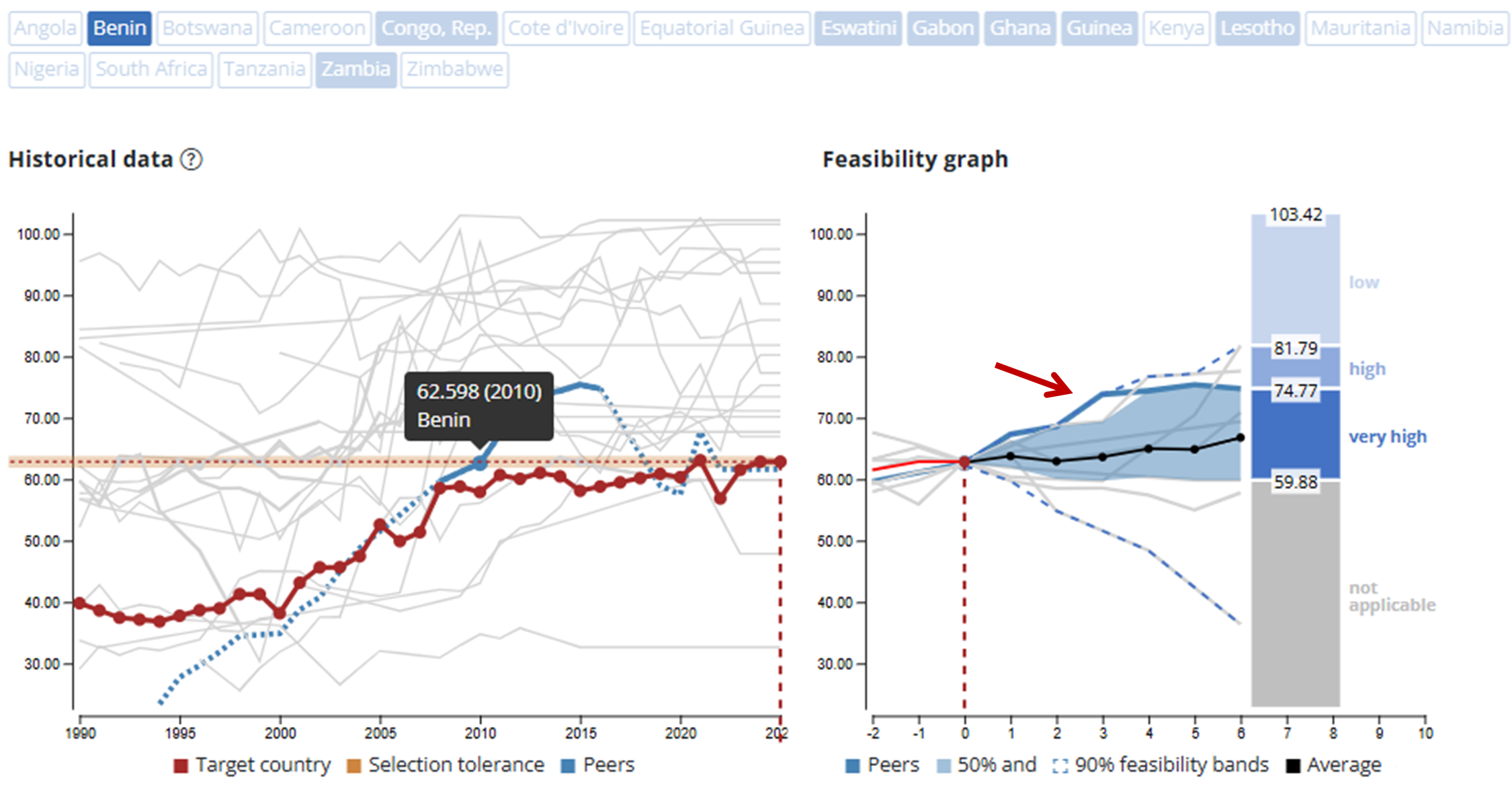
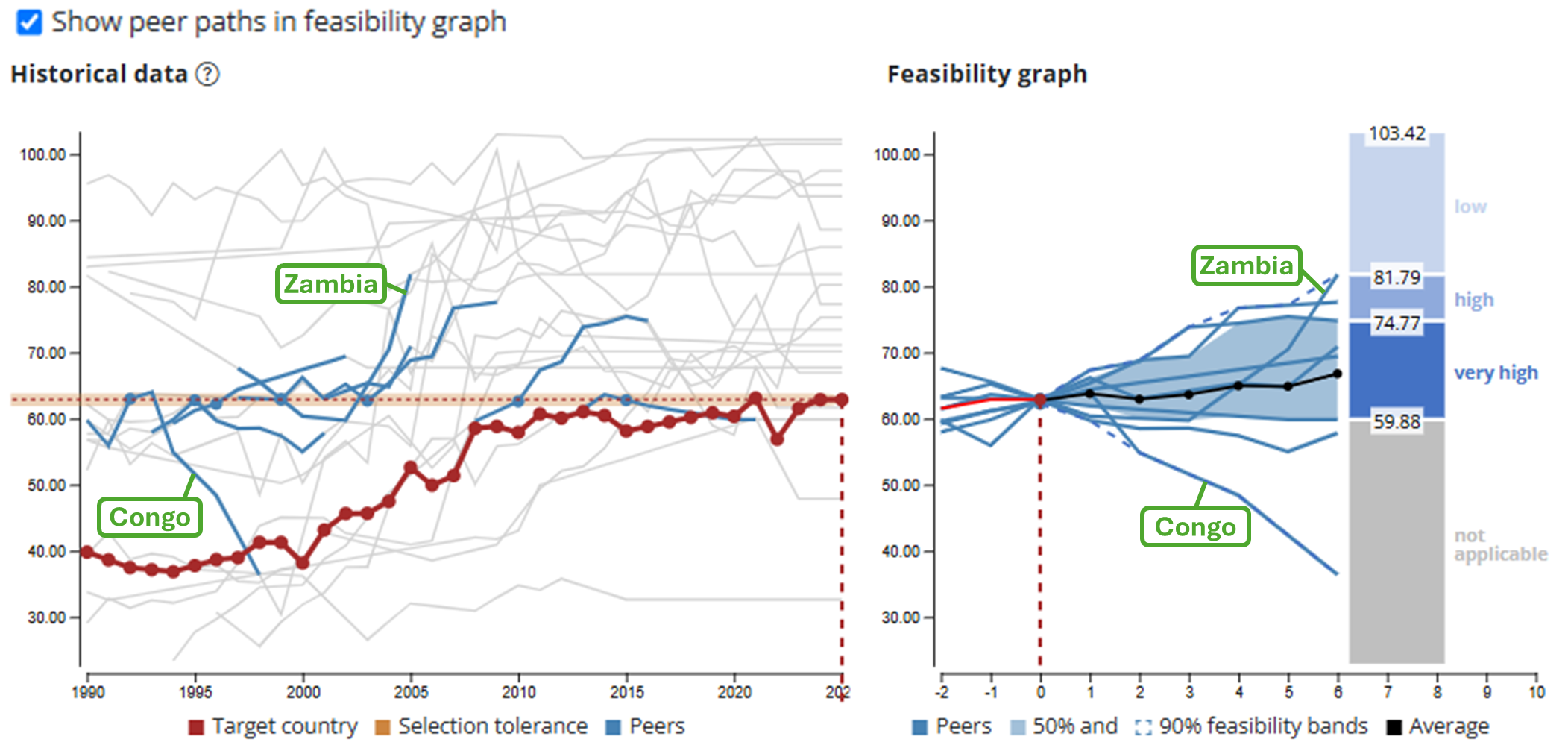
What you see: The comparable peer group is shown above the graphs, with benchmarkable peers highlighted in blue . The left graph shows historical data for all comparable peers and the target country, with the target country shown in red . The right graph shows the feasibility analysis.
How to read the graphs: In the left figure, benchmarkable peer paths are highlighted in blue, indicating the year in which each peer was close to the target country’s most recent value and how it progressed in subsequent years . The right graph aligns these paths to show how peers generally progressed after reaching a value similar to the target country's current level .
How feasibility is classified: The FAB assessment uses the distribution of benchmarkable peer outcomes to classify feasibility :
- Outcomes within the 25th to 75th percentile range are considered very highly feasible, because many peers achieved them.
- Outcomes between the 75th and 95th percentiles are considered highly feasible, because fewer peers achieved them.
- Outcomes beyond this range are considered to have low feasibility, because very few or no peers achieved them.
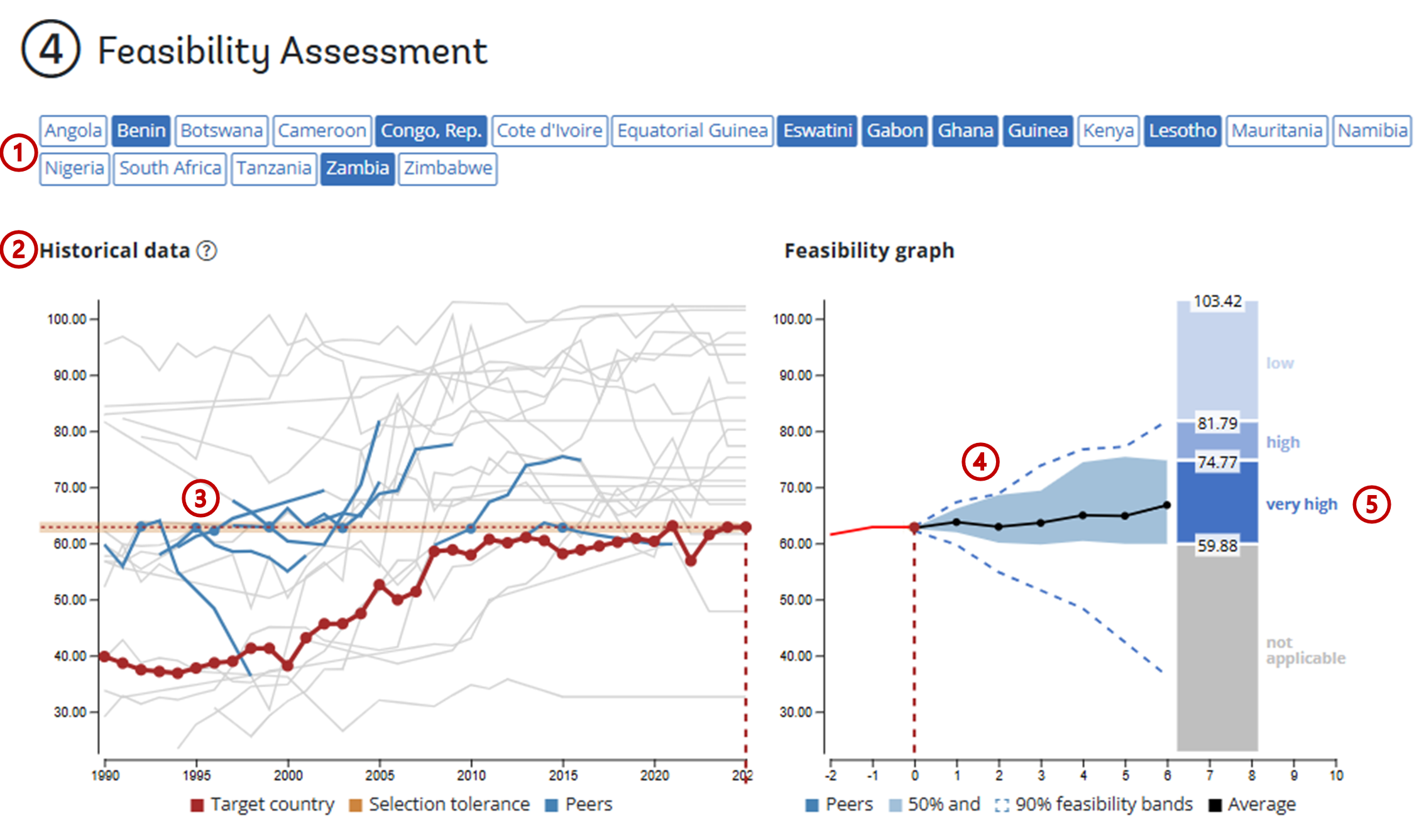
Action taken: Use the default feasibility settings. Of the 20 comparable peers, 8 are identified as benchmarkable to Senegal: Benin, Congo, Rep., Eswatini, Gabon, Ghana, Guinea, Lesotho, and Zambia.
What the analysis shows: These countries had, at some point in their history, primary completion rates close to Senegal’s most recent value of 62.856, as defined by the tolerance band.
Example: The left graph can be used to show additional detail. Hovering over one of the paths shows that Benin had a value of 62.598 in 2010. This is within the default tolerance band (+/- 1.9) deviation from Senegal’s value. Benin’s blue path shows how the indicator evolved over the following six years. If Show peer paths in feasibility graph is selected, Benin’s trajectory is also highlighted in the feasibility assessment, showing that it is among the stronger-performing countries in the benchmarkable peer group.
| Target range after six years | Feasibility | Interpretation |
|---|---|---|
| 59.88–74.77 | Very high | Many benchmarkable peers reached outcomes in this range. |
| 74.77–81.79 | High | Some benchmarkable peers reached outcomes in this range. |
| Above 81.79 | Low | No benchmarkable peer reached outcomes in this range. |
The Dashboard includes several options to enhance the assessment. These options are not inherently better or worse; instead, they allow users to test the feasibility assessment under different assumptions. Most users can rely on the default values; adjust these settings only if you want to explore alternative assumptions or fine-tune the analysis.
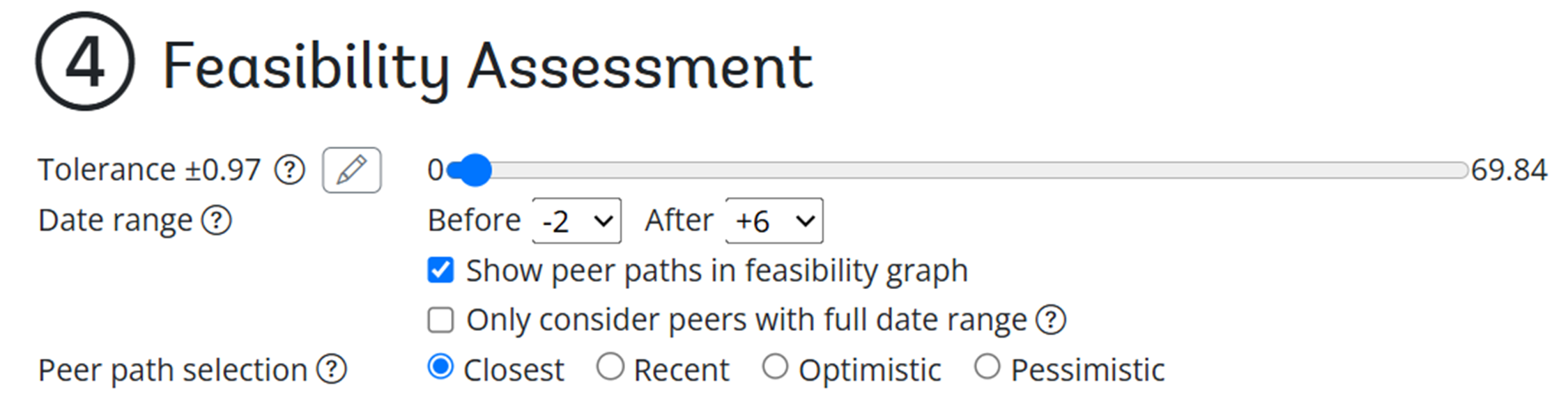
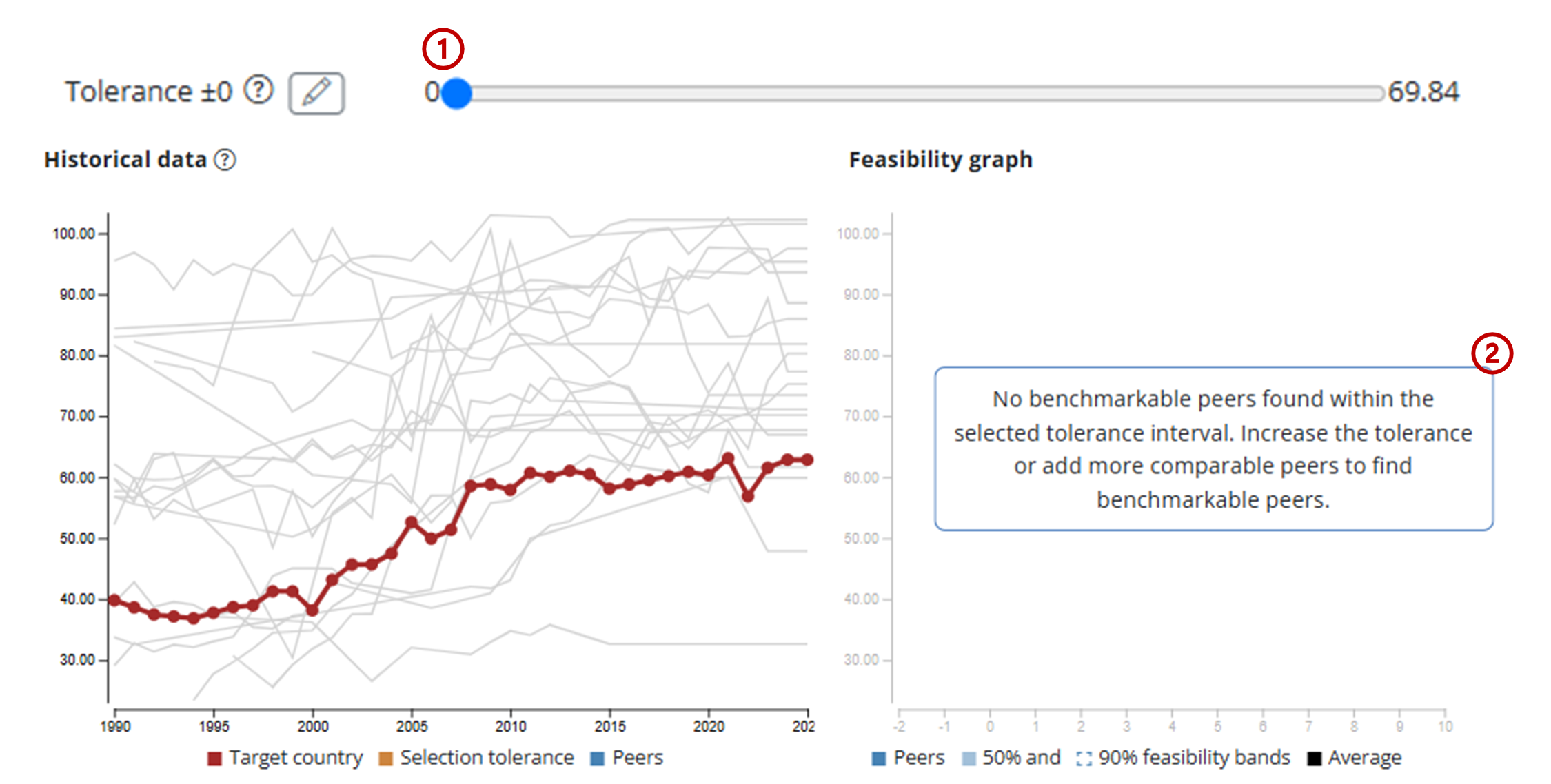
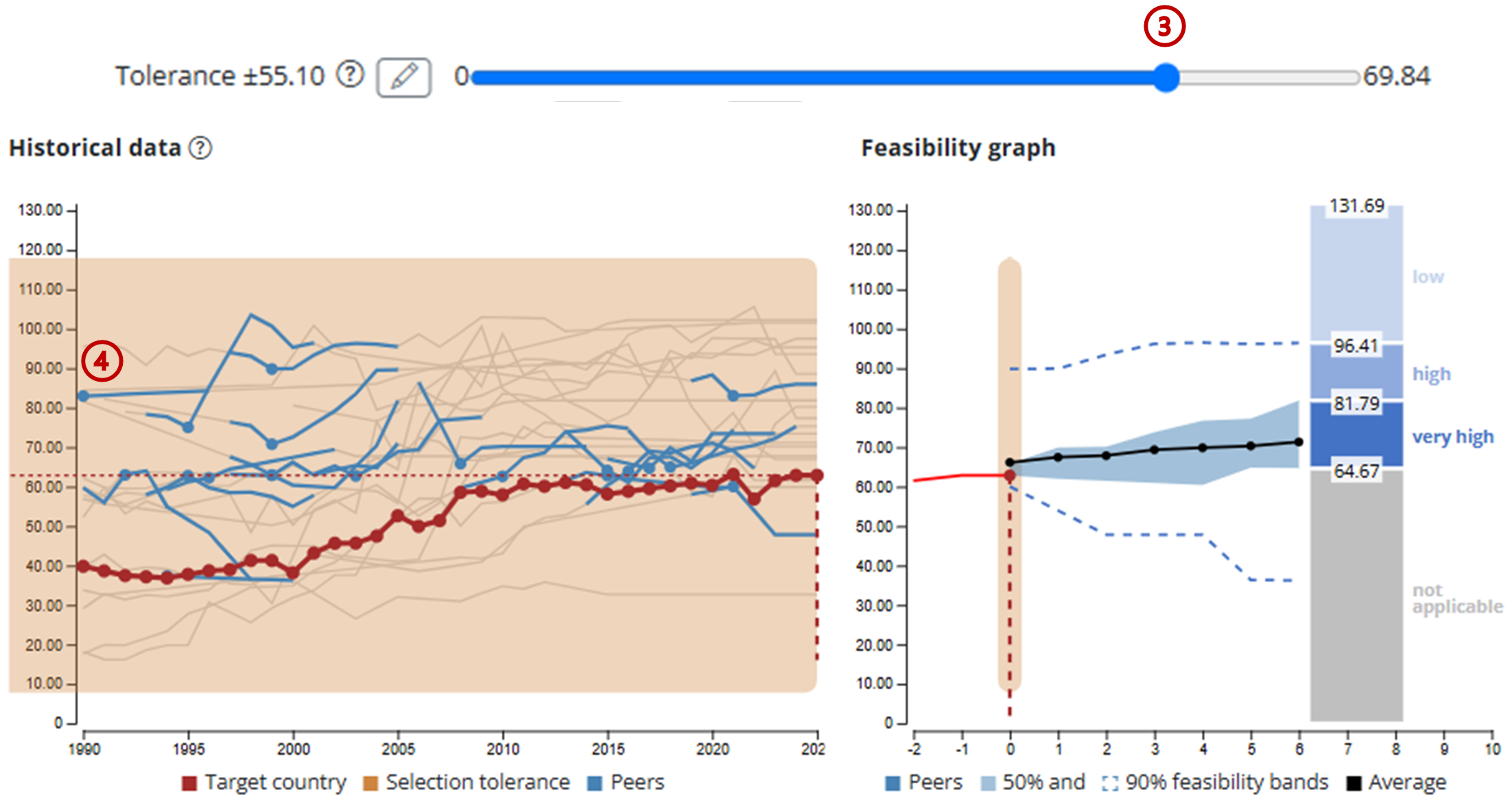
Drag the slider or use the text box to set how close a peer’s historical value must be to the target country’s current value to count as benchmarkable. A lower tolerance creates a stricter comparison and may improve comparability, but it can also reduce the number of benchmarkable peers. A higher tolerance can be useful when too few benchmarkable peers are found, but it may include countries that started from less comparable levels. By default, the tolerance is set at two times the standard deviation of the target country’s most recent value.
If the tolerance is set to 0 , the Dashboard looks for countries that once had exactly the same value as the target country. Often, no country has an exact match. Because at least five benchmarkable peers are needed for a robust benchmark, the Dashboard issues a warning when fewer than five benchmarkable peers are found .
If the tolerance is set too high , too many or all countries may qualify as benchmarkable peers . This is often not desirable, because countries that were at very different levels from the target country’s most recent value may no longer provide a meaningful comparison.
Set for how many years from now the target will be evaluated. A shorter horizon allows less time for improvement, while a longer horizon allows more time for progress but increases uncertainty in both the historical comparison and the statistical forecast. For this reason, the Dashboard limits the target horizon to a maximum of 10 years.
Select this option to see how each individual peer country’s trajectory is reflected in the feasibility assessment, rather than viewing only the feasibility intervals. This makes it easier to see which peer trajectories shape the feasibility ranges, including which peers drive the intervals upward through stronger improvements (like Zambia) and which pull them downward through weaker performance (like Congo).
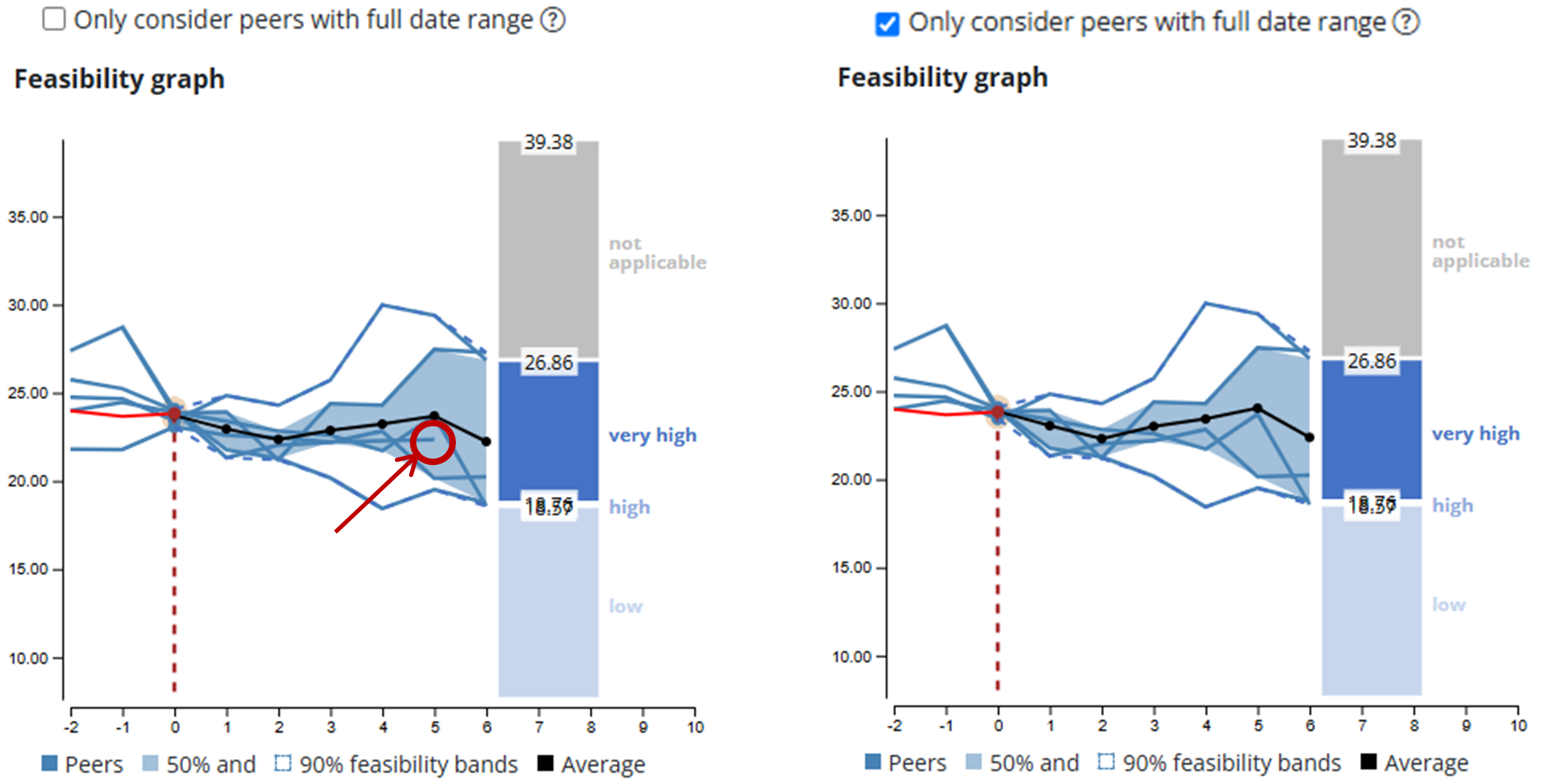
By default, the Dashboard includes benchmarkable peers that have historical data covering at least half of the target horizon, even if they do not cover the full period.
For example, if the data set runs until 2025 and a peer matched the target country’s current value in 2021, only four years of subsequent progress are available. If the target horizon is six years, that peer can still contribute to the feasibility analysis because it covers more than half of the horizon.
Select the Only consider peers with full date range option to include only peers with enough historical data to cover the full target horizon. This creates a more consistent comparison but may reduce the number of benchmarkable peers.
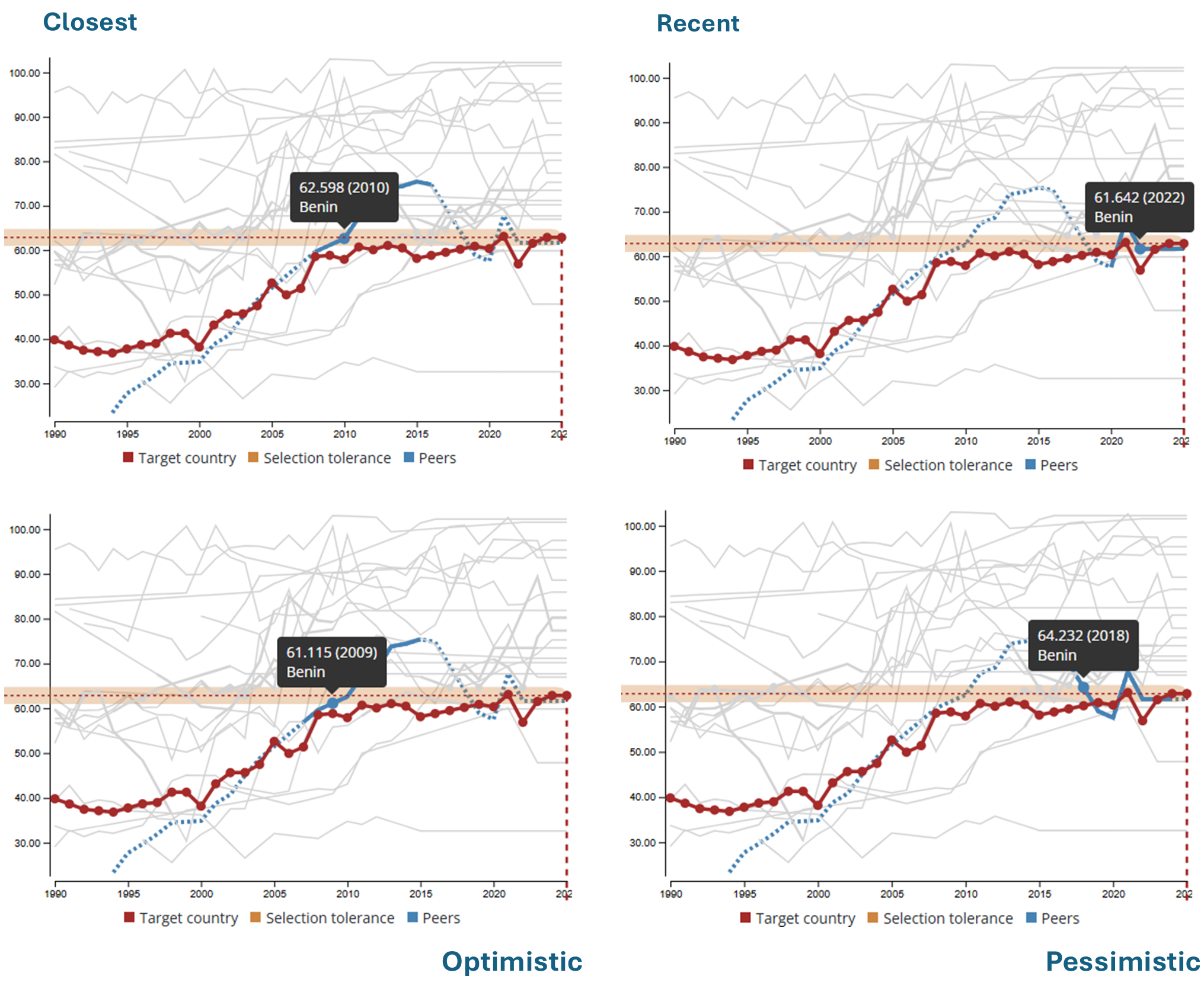
In some cases, a peer country has matched the target country’s most recent value more than once in its history. Use this setting to determine which match is used in the assessment. This setting does not change the set of benchmarkable peers; it only determines which precedent is selected for each benchmarkable country. There is no preferred option; the appropriate choice depends on which type of historical precedent the user wants to test.
| How | Why |
|---|---|
| Closest: selects the path in which the peer country’s historical value is closest to the target country’s most recent value. | Prioritizes the most comparable starting point. |
| Recent: selects the path in which the peer country’s matching year is the most recent. | Useful when recent technological innovation is relevant. |
| Optimistic: selects the path with the highest improvement. | Shows the best-case precedents. |
| Pessimistic: selects the path with the lowest improvement. | Shows the worst-case precedents. |
In the case study, Benin has multiple historical matches for Senegal’s most recent value of 62.856 in 2025. By default, the Dashboard selects the closest match: Benin had a value of 62.598 in 2010, and its trajectory can be followed for six years, through 2016, to inform the feasibility assessment. Alternatively, the most recent match can be used: Benin was at 61.642 in 2022, and the progress that followed reflects more recent developments. Another option is to select the optimistic scenario, in which Benin had a value of 61.115 in 2009 and reached 75.412 after 6 years, an increase of 10.297. This is a better outcome than the pessimistic scenario, where Benin was at 64.232 in 2018 and landed at 61.642 after 6 years, a decrease of 2.59.
Step 5 – Ambitiousness analysis
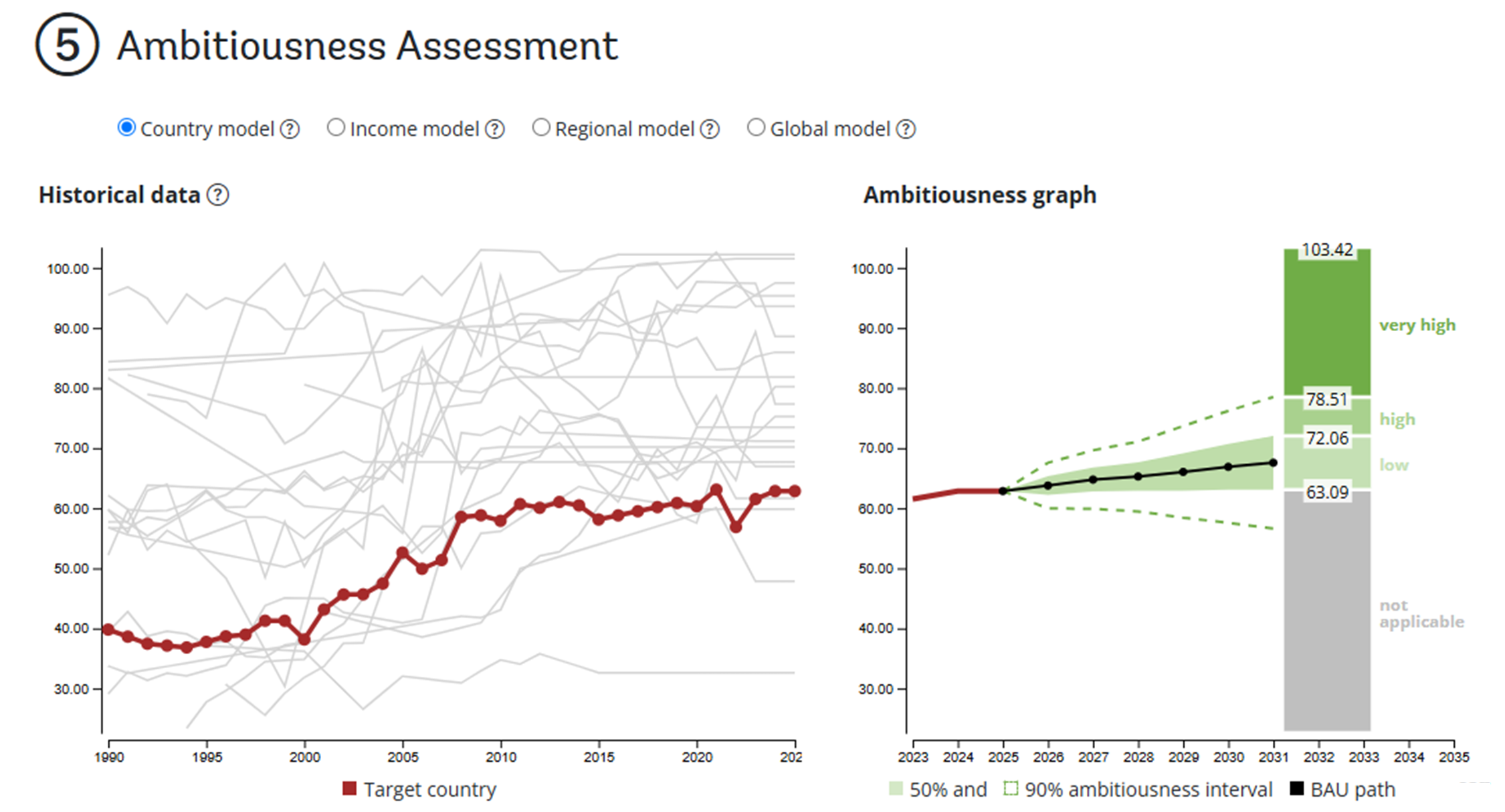
This step builds the Ambitiousness intervals based on a business-as-usual (BAU) scenario.
What is the BAU scenario? The BAU scenario estimates where the indicator is likely to be at the end of the target horizon if recent patterns continue. The Dashboard uses a statistical model to project this expected path for the target country.
How is ambitiousness classified? The uncertainty around the BAU forecast is used to define ambitiousness ranges:
- Outcomes within the 50 percent confidence interval are considered to have low ambitiousness, because they are broadly consistent with the BAU scenario.
- Outcomes between the 50 and 90 percent confidence intervals are considered highly ambitious, because they represent a substantial improvement relative to BAU.
- Outcomes beyond the 90 percent confidence interval are considered very highly ambitious, because they represent a large deviation from the expected path.
There are several ways to forecast the indicator and construct the BAU scenario. The FAB Dashboard allows users to select from four simple models:
| Model | How it builds the BAU forecast | When it may be useful |
|---|---|---|
| Country | Uses only historical trends in the target country. | When the country has a sufficiently long and stable time series and its own past trajectory is considered the most relevant basis for projection. |
| Income | Uses trends among countries in the same income group. | When progress is likely to depend on development level, fiscal capacity, infrastructure, or access to technology. |
| Regional | Uses trends among countries in the same geographic region. | When geography, climate, ecosystems, regional infrastructure, or shared environmental conditions are likely to shape the indicator. |
| Global | Uses trends across all countries in the data set. | When the underlying change is broadly global, or when country-, income-, or region-specific trends are too limited to provide a stable basis for projection. |
Action taken: Use the income model to estimate the BAU scenario for Senegal’s primary completion rate.
Why: The income model uses trends among countries at a similar income level, providing a broader basis for projecting Senegal’s expected progress.
Result: The dashboard classifies possible target values after six years as follows:
| Target range | Ambitiousness | Interpretation |
|---|---|---|
| 63.09–72.06 | Low | Falls within the BAU range and could occur without substantial deviation from expected trends. |
| 72.06–78.51 | High | Represents a substantial improvement relative to the BAU scenario. |
| Above 78.51 | Very high | Represents an outcome well beyond the expected BAU path. |
Step 6 – Joint Assessment
The joint assessment brings the full analysis together and shows how feasibility and ambitiousness relate to each other. Use this page to explore target ranges that balance historical precedent with meaningful improvement beyond the BAU scenario. Users can drag the red handles to define a target range to test. They can also enter a custom target value to see its feasibility and ambitiousness classification directly. The text below the chart updates automatically to show the classification for the selected range or target value.
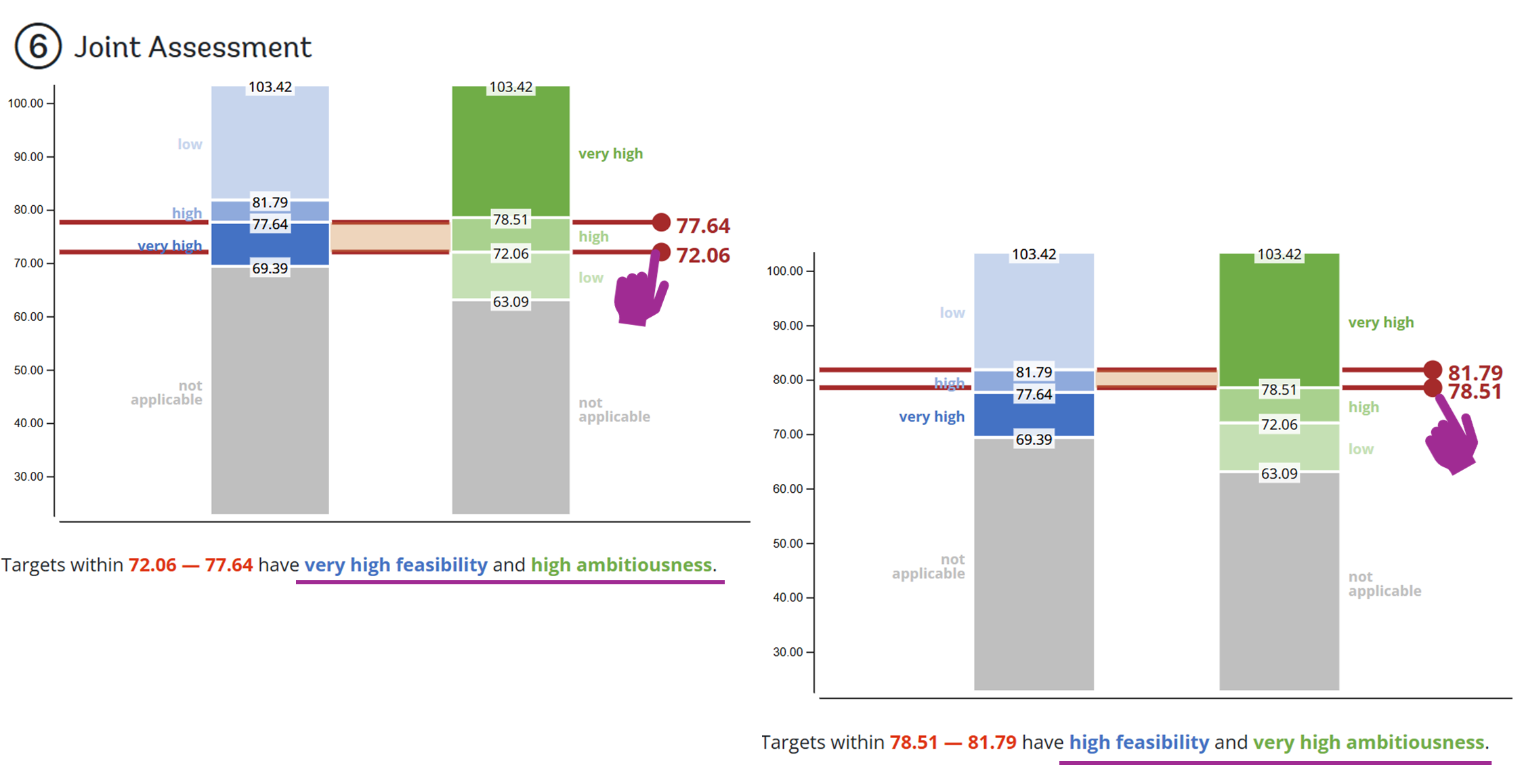
Result: The joint assessment allows users to explore different trade-offs between feasibility and ambitiousness. For Senegal, the following two target ranges illustrate how a higher level of ambitiousness can be balanced against the strength of historical precedent:
| Target range | Feasibility | Ambitiousness | Interpretation |
|---|---|---|---|
| 72.06–77.64 | Very high | High | Strong historical precedent combined with meaningful improvement beyond BAU. |
| 78.51–81.79 | High | Very high | A more ambitious range that remains supported by historical peer performance. |
Share your analysis
Users can share an analysis through a URL that captures the indicator, target country, selected peers, and settings exactly as configured. Use the link when you want others to review the analysis interactively, explore the Dashboard, or adjust the assumptions themselves.
Users can also click “Export FAB assessment as PDF” to generate a one-page summary of the analysis. Use the PDF when you want to share a concise, static summary with colleagues, decision-makers, or other stakeholders.
